Arq on macOS - backup plan footguns, logs, and arqc
I run Arq 7 on a Mac with two backup plans: a local destination on an external NVMe, and an Arq Premium cloud plan backing up /Users/tom to Arq Cloud Storage. Local backups worked fine. The cloud plan failed repeatedly while uploading hundreds of megabytes of data - which made the failure harder to spot at first, because something was getting through.
This post collects the non-obvious behaviour I ran into setting that up, where to look when things go wrong, and how to monitor plans from the shell.
Two plans are not one plan twice
Arq treats each backup plan as independent. There is no “duplicate plan” or “copy all settings from…” action. You can import and export file selections on the Files tab, which covers folder choices and wildcard/regex exclusion rules. It does not copy Schedule, Network, Retention, Options, or Report settings.
If you build a cloud plan to mirror a working local plan, you are doing it tab by tab. That is how I ended up with two plans that looked similar but behaved differently.
The failure: cloud uploads, then errors anyway
The cloud backup scanned ~44 GB, uploaded compressed deltas, and still marked the run as failed. The Arq Agent log (/Library/Logs/ArqAgent/) showed hundreds of errors like:
Unable to materialize dataless file: Cloud file contents not present on disk
These are iCloud placeholder files - entries under ~/Library/Mobile Documents/ that exist in iCloud but are not downloaded locally. Arq was trying to read them anyway.
The local plan logged:
Skipped N dataless (cloud-only) files because the backup plan's dataless-files behavior is set to ignore.
The cloud plan did not. Same machine, same home folder tree, different Options -> Dataless files setting. Cloud was set to materialize; local was set to ignore.
Fix: set Dataless files to Ignore on the cloud plan (matching local), and add exclusions for the iCloud app paths that were still being walked.
Wildcard exclusions do not cover iCloud Mobile Documents
My local plan already had 50+ wildcard exclusion rules - caches, node_modules, Mail container paths, Safari databases, and so on. The cloud plan had the same list. Neither covered the failing paths.
Mail-related wildcards like */Library/Containers/com.apple.mail/... and */MailData/Envelope Index target the local Mail.app container. iCloud-synced mail data lives under a different tree:
~/Library/Mobile Documents/com~apple~mail/...
The errors clustered in:
Path under ~/Library/Mobile Documents/ |
What it is |
|---|---|
iCloud~com~hegenberg~BetterTouchTool/... |
BetterTouchTool iCloud sync database |
F6266T9T75~com~apple~iMovie/Theater/... |
iMovie Theatre metadata |
com~apple~mail/... |
iCloud mail data (not the Mail container) |
com~apple~TextInput/... |
iCloud text input dictionaries |
I added four wildcard lines (paths relative to the backup source /Users/tom):
Library/Mobile Documents/iCloud~com~hegenberg~BetterTouchTool
Library/Mobile Documents/F6266T9T75~com~apple~iMovie
Library/Mobile Documents/com~apple~mail
Library/Mobile Documents/com~apple~TextInput
A broader alternative is a single rule:
Library/Mobile Documents
That skips the entire iCloud container tree, including iCloud Drive files you have downloaded locally (com~apple~CloudDocs), Obsidian vaults synced via iCloud, and other app folders. Fine if you treat iCloud as the canonical store for that data; too aggressive if you want Arq Cloud to cover locally-present iCloud Drive files.
Where the logs actually are
Arq splits logging across user and system locations. For backup failures, the useful file is usually the Arq Agent log, not the Arq.app UI log:
| Location | What it is |
|---|---|
/Library/Logs/ArqAgent/ |
Root-owned agent log - scan progress, upload totals, per-file errors |
/Library/Application Support/ArqAgent/logs/backup/backup-* |
Per-run activity summaries (human-readable) |
~/Library/Logs/Arq/ |
Arq.app UI process - OAuth checks, websocket to agent |
~/Library/Logs/ArqMonitor/ |
Menu bar monitor app |
The agent database at /Library/Application Support/ArqAgent/server.db is readable without sudo and stores plan config as JSON in the backup_plans table. Useful for verifying settings when the UI and behaviour do not seem to match.
Monitoring with arqc
Arq ships a command-line utility at:
/Applications/Arq.app/Contents/Resources/arqc
Documented in the arqc reference. Relevant commands for health checks:
# List plans (UUID, name, destination)
arqc listBackupPlans

# Latest run metadata as JSON
arqc latestBackupActivityJSON 92F098C5-8D16-4642-85D9-B18993DA1FA4

# Human-readable activity log for the latest run
arqc latestBackupActivityLog 92F098C5-8D16-4642-85D9-B18993DA1FA4
The JSON includes errorCount, maxErrorSeverity, message, and activityLogPath. Set an app password in Arq -> Preferences if you want scripted access without warnings.
Example check: exit non-zero when the latest cloud plan activity has errors:
#!/bin/bash
CLOUD_PLAN_UUID="92F098C5-8D16-4642-85D9-B18993DA1FA4"
ARQC="/Applications/Arq.app/Contents/Resources/arqc"

errors=$("$ARQC" latestBackupActivityJSON "$CLOUD_PLAN_UUID" 2>/dev/null \
  | python3 -c "import sys,json; print(json.load(sys.stdin).get('errorCount', -1))")

if [[ "$errors" != "0" ]]; then
  echo "Arq cloud backup: errorCount=$errors"
  exit 1
fi
arqc can also start and stop plans (startBackupPlan, stopBackupPlan) and pause all backups (pauseBackups / resumeBackups). There is no documented read-only “list all activities” endpoint beyond the latest per plan - enough for a simple last-run-ok check, not a full audit trail.
UX nits
Things I wish I had known before spending an afternoon on this:
Premium error email is cloud-plan only. Arq Premium’s built-in relay only works for Arq Cloud Storage. On a local destination (my NVMe plan), “Use Arq Premium server” stays greyed out on the Report tab even with Send set to “only when errors occur” and an active Premium subscription:
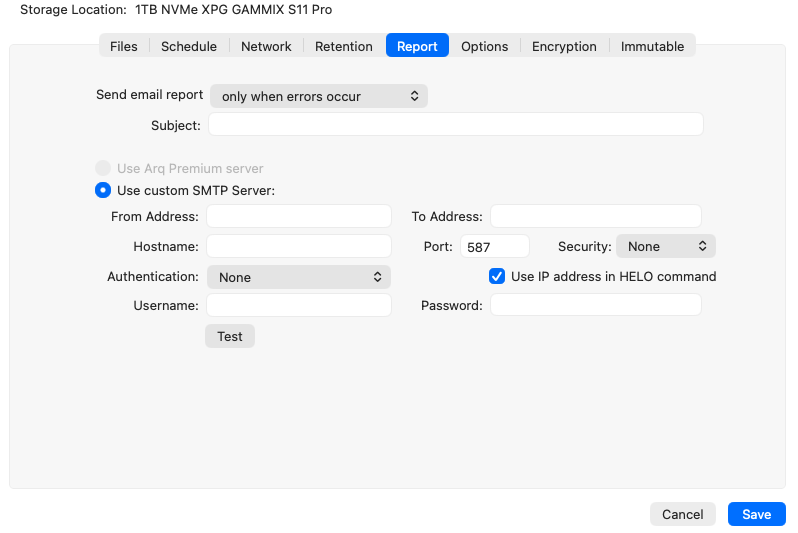
Custom SMTP still works for local plans; the Premium relay does not. For local failure alerts I use Apprise, a cron job wrapping arqc, or Home Assistant.
When Send is “never”, Premium and SMTP options stay visible but greyed out with no explanation. Hiding the email section would be clearer.
“Also start backup when a volume is connected” (Schedule tab) has no tooltip. It means: if a volume involved in this plan connects, start the backup. For a cloud plan whose source is an internal APFS volume and destination is Arq Cloud Storage, plugging in an unrelated external drive does nothing. It is not “retry when cloud storage comes back after an outage.” I left it disabled on the cloud plan:
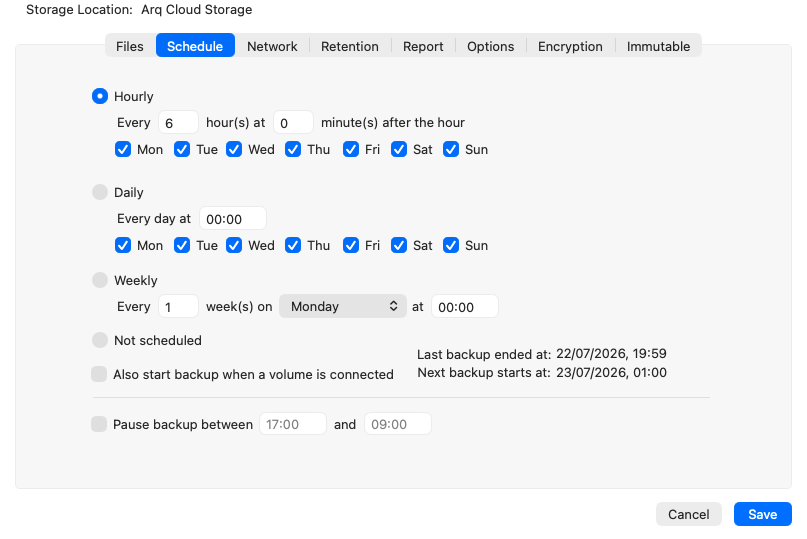
There is no full-plan duplicate. Import/Export on Files covers exclusions but not Options such as dataless-file handling. Align those manually when mirroring a plan across destinations.
Checklist for a second plan
If you add a cloud plan alongside a working local one:
- Files tab: import/export exclusions, or paste the same wildcard list; add
Library/Mobile Documents/...rules if backing up a user home folder on macOS. - Options tab: set Dataless files to Ignore unless you have a reason to materialize iCloud placeholders.
- Schedule tab: decide whether “when a volume is connected” applies (usually no for cloud-only plans).
- Report tab: Premium email only applies to cloud; plan a separate alert path for local failures.
- Verify: run a backup, check
arqc latestBackupActivityJSON <uuid>forerrorCount: 0, and read/Library/Application Support/ArqAgent/logs/backup/backup-*if not.